1️⃣ Environments
Learning Objectives
- Understand how the pottery shop environment is implemented as batched tensor operations
- Build intuition for the dynamics of the environment
Pottery shop: a simple environment
Our environment, called "pottery shop", features a robot that the agent can control.
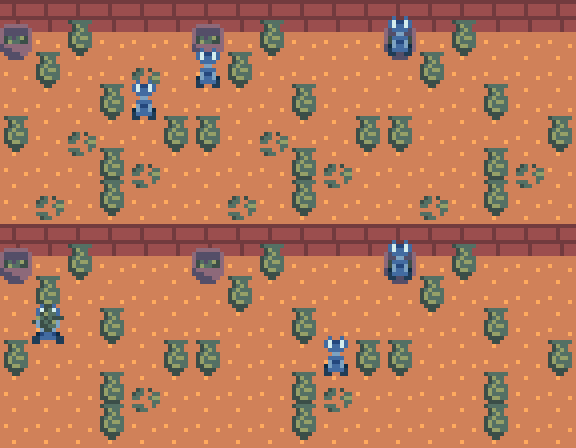
This grid world contains various objects:
- Urns : fragile urns that will get smashed and turned into shards if walked into.
- Shards : broken pieces of an urn we want cleaned up.
- A bin : a place for the robot to dispose of shards.
- A robot : there is a small blue robot who can move around the grid, pick up shards, carry them around, and drop them (e.g., into the bin). If the robot walks into one of the urns, the urn will break, creating a new pile of shards.
The agent can make the robot move in any of the four cardinal directions, pick up shards, and dump held shards onto the floor (or the bin).
Here we see the robot cleaning up the room (with a hard-coded exemplar policy): it picks up each pile of shards in turn and carries it to the bin in the top left corner, without smashing any urns in the process.
The pottery shop environment is implemented in the source file part32_goal_misgen/potteryshop.py.
Some relevant snippets of code are as follows.
Environment details
Pottery shop actually refers to a family of environments of different sizes and
with different initial configurations of objects.
We represent envs many parallel environments as an Environment dataclass, defined in part32_goal_misgen/potteryshop.py along with the types below:
```python no-copy @dataclass(frozen=True) class Environment: init_robot_pos: Int64[Tensor, "envs 2"] init_items_map: Int64[Tensor, "envs size size"] bin_pos: Int64[Tensor, "envs 2"]
In particular, the fields are as follows:

* `init_robot_pos` contains the row `init_robot_pos[:, 0]` and column `init_robot_pos[:, 1]` grid coordinates of the spawn position of the robot.
* `bin_pos` similarly contains the row `bin_pos[:, 0]` and column `bin_pos[:, 1]` grid coordinates of the spawn position of the bin.
* `init_items_map` is an `(envs, N, N)` tensor where `N` is the size of the grid world. The contents of the tensor map to the presence of shards or urns in the respective grid squares.

The following enumeration type explains how to interpret the numbers in `init_items_map`.

```python no-copy
class Item(enum.IntEnum):
    EMPTY = 0
    SHARDS = 1
    URN = 2
The coordinates in init_robot_pos and bin_pos should range from 0 to size-1,
and the values in init_items_map should all be 0, 1, or 2.
Environment state
The environment object encodes the initial configuration of the pottery shop. But once we start taking actions, the state will change. At any time, the current state of the grid world is represented by the following dataclass.
```python no-copy @dataclass(frozen=True) class State: robot_pos: Int[Tensor, "envs 2"] bin_pos: Int[Tensor, "envs 2"] items_map: Int[Tensor, "envs size size"] inventory: Int[Tensor, "envs"]
The fields `robot_pos`, `bin_pos`, and `items_map` are the dynamic versions of
`init_robot_pos`, `bin_pos`, and `init_items_map` from the environment configuration.

What's new is `inventory`, an integer that represents what kind of item
the robot is carrying. This is initially `Item.EMPTY`, but changes to
`Item.SHARDS` if the robot picks up a pile of shards
(and changes back to `Item.EMPTY` if the robot drops the shards).


### Agent actions

The agent is responsible for controlling the robot as it moves around the grid.
In each interaction, the agent sees the current state, and then chooses what the robot should do from the following options.

```python no-copy
class Action(enum.IntEnum):
    WAIT = 0 # do nothing
    UP = 1 # move up
    LEFT = 2 # move left
    DOWN = 3 # move down
    RIGHT = 4 # move right
    PICKUP = 5 # pick up item
    PUTDOWN = 6 # drop held item
Environment methods
The environment class provides the following methods:
-
def reset(self, num_rollouts: int | None = None) -> State:- Initialises a batched
State(for a single environment,num_rolloutsparallel copies of the initial state).
- Initialises a batched
-
def step(self, state: State, action: Int[Tensor, "B"]) -> State:- Takes the current (batched) state and the agent's actions ( one per environment in the batch) and returns the resulting state of the environment (for example, moving the robot, updating its inventory, smashing urns).
We encourage you to skim the implementation in part32_goal_misgen/potteryshop.py:
the environment dynamics are about 60 lines of (heavily commented) tensor operations.
Reward Function
We deliberately don't specify a reward function for this environment, as the goal of today is thinking about how to design reward functions to incentivise desired behaviour.
Play it yourself!
You can play the pottery shop in your browser to get a feel for how the world works.
Below we instantiate an instance of the pottery shop environment.
We can see the Environment object requires the following arguments:
init_robot_pos: the initial position of the robotinit_items_map: the map of all the location of objects in the environment0represents an empty grid square1represents a pile of shards2represents an urn
bin_pos: the position of the bin
env = Environment(
    init_robot_pos=t.tensor((1, 2), dtype=t.long),
    init_items_map=t.tensor(
        (
            (0, 0, 0, 0, 2, 2),
            (0, 1, 0, 0, 0, 2),
            (0, 0, 0, 0, 0, 0),
            (0, 1, 1, 0, 0, 2),
            (0, 0, 0, 0, 2, 2),
            (2, 0, 1, 0, 2, 2),
        ),
        dtype=t.long,
    ),
    bin_pos=t.tensor((0, 0), dtype=t.long),
)

tests.test_env(env)