☆ Bonus - Feature Extraction
Learning Objectives
- Understand the difference between feature extraction and finetuning
- Perform feature extraction on a pre-trained ResNet
Now that you've seen how to build a modular training loop, and you've seen how ResNet works and is built, we're going to put these two things together to finetune a ResNet model on a new dataset.
Finetuning can mean slightly different things in different contexts, but broadly speaking it means using the weights of an already trained network as the starting values for training a new network. Because training networks from scratch is very computationally expensive, this is a common practice in ML.
The specific type of finetuning we'll be doing here is called feature extraction. This is when we freeze most layers of a model except the last few, and perform gradient descent on those. We call this feature extraction because the earlier layers of the model have already learned to identify important features of the data (and these features are also relevant for the new task), so all that we have to do is train a few final layers in the model to extract these features.
Terminology note - sometimes feature extraction and finetuning are defined differently, with finetuning referring to the training of all the weights in a pretrained model (usually with a small or decaying learning rate), and feature extraction referring to the freezing of some layers and training of others. To avoid confusion here, we'll use the term "feature extraction" rather than "finetuning".
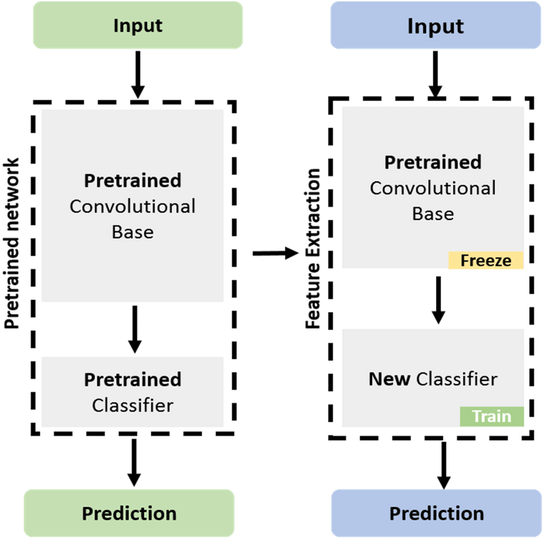
How do we prepare a model for feature extraction? By freezing layers of our model.
We'll discuss freezing layers & the backpropagation algorithm in much more detail tomorrow, but for now it's fine to just understand what's going on at a basic level. When we call loss.backward() in our training loop (or when this is implicitly called by our PyTorch Lightning trainer), this propagates gradients from our loss scalar back to all parameters in our model. If a parameter has its requires_grad attribute set to False, it means gradients won't be computed for this tensor during backpropagation. Thanks to PyTorch helpfully keeping track of the parameters which require gradients (using a structure called the computational graph), if we set requires_grad = False for the first few layers of parameters in our model, PyTorch will actually save us time and compute by not calculating gradients for these parameters at all.
See the code below as an example of how gradient propagation stops at tensors with requires_grad = False.
layer0, layer1 = nn.Linear(3, 4), nn.Linear(4, 5)

layer0.requires_grad_(False)  # generic code to set `param.requires_grad=False` recursively for a module / entire model

x = t.randn(3)
out = layer1(layer0(x)).sum()
out.backward()

assert layer0.weight.grad is None
assert layer1.weight.grad is not None
Exercise - prepare ResNet for feature extraction
First, you should complete the function below to do the following:
- Instantiate a
ResNet34model using your class, and copy in weights from a pretrained model (you can use code from earlier here) - Disable gradients for all layers
- Replace the final linear layer with a new linear layer, which has the same number of
in_features, but a different number ofout_features(given by then_classesargument).
def get_resnet_for_feature_extraction(n_classes: int) -> ResNet34:
    """
    Creates a ResNet34 instance, replaces its final linear layer with a classifier for `n_classes`
    classes, and freezes all weights except the ones in this layer.

    Returns the ResNet model.
    """
    raise NotImplementedError()


tests.test_get_resnet_for_feature_extraction(get_resnet_for_feature_extraction)
Solution
def get_resnet_for_feature_extraction(n_classes: int) -> ResNet34:
    """
    Creates a ResNet34 instance, replaces its final linear layer with a classifier for `n_classes`
    classes, and freezes all weights except the ones in this layer.

    Returns the ResNet model.
    """
    # Create a ResNet34 with the default number of classes
    my_resnet = ResNet34()

    # Load the pretrained weights
    pretrained_resnet = models.resnet34(weights=models.ResNet34_Weights.IMAGENET1K_V1)

    # Copy the weights over
    my_resnet = copy_weights(my_resnet, pretrained_resnet)

    # Freeze grads for all layers
    my_resnet.requires_grad_(False)

    # Redefine last layer, with new number of classes (this unfreezes the last layer)
    my_resnet.out_layers[-1] = Linear(my_resnet.out_features_per_group[-1], n_classes)

    return my_resnet
We'll now give you some boilerplate code for your training arguments. The CIFAR10 dataset class is imported from fundamentals_utils; it downloads the data from HuggingFace and exposes the same .data, .targets and .classes attributes as torchvision.datasets.CIFAR10. We have a custom loader for this
as
* the default torchvision.datasets.CIFAR10 downloads directly from cs.toronto.edu which is often slow or sometimes goes offline. Our custom version in chapter0_fundamentals/fundamental_utils.py presents the same interface as the torchvision version, but downloads from a mirror on HuggingFace instead.
* We want the data on the CPU, move the images to the GPU, and then after
apply the transformations (resizing to 224 x 224, converting to floats, and normalizing) via GPU accelerated operations. Transforming first means the GPU starves as the transformations on the CPU become the bottleneck. This wouldn't realistically be the case for a much larger model, but ResNet23 is <1M parameters (tiny by today's standards), so it hurts us here.
@dataclass
class ResNetTrainingArgs:
    batch_size: int = 64
    epochs: int = 5
    learning_rate: float = 1e-3
    n_classes: int = 10
The dataclass we've defined containing training arguments is basically the same as the one we had for the convnet, the main difference is that we're now using the CIFAR-10 dataset. This is the dataset we'll be training our model on. It consists of 60000 32x32 colour images in 10 classes, with 6000 images per class. See the link for more information.
Exercise - write training loop for feature extraction
We now come to the final task - write a training loop for your ResNet model. This shouldn't be too difficult because most of the code can be directly taken from the exercise in section 2️⃣, however there are a few changes you should take note of:
- Since all other parameters' gradients have been frozen, it doesn't really matter which parameters you pass to your optimizer. However, note that you have the option of passing just a subset of parameters using e.g.
AdamW(model.some_module.parameters(), ...). - Now that we're working with batchnorm, you'll have to call
model.train()andmodel.eval()before your training and validation loops (recall that the behaviour of batchnorm changes between training and eval modes). - Make sure you're connected to GPU runtime rather than CPU, otherwise this training might take quite a while.
- You will also find that this trains a lot faster/uses less memory than fine-tuning the entire model. The reason is that since most of the parameters in the network are frozen, autograd will not bother to save their activations during the forward pass (saving memory), and will not bother to compute their gradients during the backward pass (saving memory and time). From the perspective of autograd, the activations that flow into the new classifer act like a leaf tensor, and backpropagation need not proceed all the way through the model. The optimizer also runs faster, as there are much fewer parameters that need to be updated.
- Also make sure you're logging progress within each epoch, since the epochs might each take a while (although we've given you the
get_cifar_subsetfunction which returns a subset of the CIFAR10 data, and we recommend using this function with default parameters so that each epoch is a bit faster). - Dont forget to transform the images once they are on the GPU, and before you feed them to the model, with
imgs = IMAGENET_TRANSFORM(imgs).
from torch.utils.data import Subset


def get_cifar_subset( trainset_size: int = 10_000, testset_size: int = 1_000,
) -> tuple[Subset, Subset]:
    """Returns a subset of CIFAR-10 train & test sets (slicing the first examples)."""
    cifar_trainset = CIFAR10(train=True)
    cifar_testset = CIFAR10(train=False)
    return Subset(cifar_trainset, range(trainset_size)), Subset(cifar_testset, range(testset_size))


def train(args: ResNetTrainingArgs) -> tuple[list[float], list[float], ResNet34]:
    """
    Performs feature extraction on ResNet, returning the model & lists of loss and accuracy.
    """

    # YOUR CODE HERE - write your train function for feature extraction
    raise NotImplementedError()
args = ResNetTrainingArgs()
loss_list, accuracy_list, model = train(args)

line(
    y=[
        loss_list,
        [1 / args.n_classes] + accuracy_list,
    ],  # we start by assuming a uniform accuracy of 10%
    use_secondary_yaxis=True,
    x_max=args.epochs * 10_000,
    labels={"x": "Num examples seen", "y1": "Cross entropy loss", "y2": "Test Accuracy"},
    title="ResNet Feature Extraction",
    width=800,
)
Click to see the expected output
Spoilers - what kind of results should you get?
If you train the whole model rather than just the final layer, you should find accuracy increases very slowly, not getting very far above random chance. This reflects the fact that the model is trying to learn a new task (classifying images into 10 classes) from scratch, rather than just learning to extract features from images, and this takes a long time!
If you train just the final layer, your accuracy should reach around 70-80% by the first epoch. This is because the model is already very good at extracting features from images, and it just needs to learn how to turn these features into predictions for this new set of classes.
Solution
from torch.utils.data import Subset


def get_cifar_subset( trainset_size: int = 10_000, testset_size: int = 1_000,
) -> tuple[Subset, Subset]:
    """Returns a subset of CIFAR-10 train & test sets (slicing the first examples)."""
    cifar_trainset = CIFAR10(train=True)
    cifar_testset = CIFAR10(train=False)
    return Subset(cifar_trainset, range(trainset_size)), Subset(cifar_testset, range(testset_size))


def train(args: ResNetTrainingArgs) -> tuple[list[float], list[float], ResNet34]:
    """
    Performs feature extraction on ResNet, returning the model & lists of loss and accuracy.
    """


    model = get_resnet_for_feature_extraction(args.n_classes).to(device)

    trainset, testset = get_cifar_subset()

    trainloader = DataLoader(
        trainset,
        batch_size=args.batch_size,
        shuffle=True,
    )
    testloader = DataLoader(
        testset,
        batch_size=args.batch_size,
        shuffle=False,
    )

    optimizer = t.optim.Adam(
        model.out_layers[-1].parameters(),
        lr=args.learning_rate,
    )

    loss_list = []
    accuracy_list = []

    for epoch in range(args.epochs):
        # Training loop
        model.train()

        pbar = tqdm(trainloader)
        for imgs, labels in pbar:
            # Move data to device first, then perform transforms on GPU
            imgs = imgs.to(device)
            labels = labels.to(device)
            imgs = IMAGENET_TRANSFORM(imgs)

            # Forward pass
            logits = model(imgs)

            # Calculate loss, perform backward pass
            loss = F.cross_entropy(logits, labels)

            loss.backward()
            optimizer.step()
            optimizer.zero_grad()

            # Update logs & progress bar
            loss_list.append(loss.item())
            pbar.set_postfix(
                epoch=f"{epoch + 1}/{args.epochs}",
                loss=f"{loss:.3f}",
                refresh=False,
            )

        # Validation loop
        model.eval()

        num_correct_classifications = 0

        for imgs, labels in testloader:
            # Move data to device first, then perform transforms on GPU
            imgs = imgs.to(device)
            labels = labels.to(device)
            imgs = IMAGENET_TRANSFORM(imgs)

            # Forward pass
            with t.inference_mode():
                logits = model(imgs)

            # Compute num correct by comparing argmaxed logits to true labels
            predictions = t.argmax(logits, dim=1)
            num_correct_classifications += (predictions == labels).sum().item()

        # Compute & log total accuracy
        accuracy = num_correct_classifications / len(testset)
        accuracy_list.append(accuracy)

    return loss_list, accuracy_list, model