3️⃣ Function Vectors
Learning Objectives
- Define a metric to measure the causal effect of each attention head on the correct performance of the in-context learning task
- Understand how to rearrange activations in a model during an
nnsightforward pass, to extract activations corresponding to a particular attention head- Learn how to use
nnsightfor multi-token generation
In this section, we'll replicate the crux of the paper's results, by identifying a set of attention heads whose outputs have a large effect on the model's ICL performance, and showing we can patch with these vectors to induce task-solving behaviour on randomly shuffled prompts.
We'll also learn how to use nnsight for multi-token generation, and steer the model's behaviour. There exist exercises where you can try this out for different tasks, e.g. the Country-Capitals task, where you'll be able to steer the model to complete prompts like "When you think of Netherlands, you usually think of" by talking about Amsterdam.
Note - this section structurally follows sections 2.2, 2.3 and some of section 3 from the function vectors paper.
Here, we'll move from thinking about residual stream states to thinking about the output of specific attention heads.
Extracting & using FVs
A note on out_proj
First, a bit of a technical complication. Most HuggingFace models don't have the nice attention head representations. What we have is the linear layer out_proj which implicitly combines the "projection per attention head" and the "sum over attention head" operations (if you can't see how this is possible, see the section "Attention Heads are Independent and Additive" from Anthropic's Mathematical Framework).
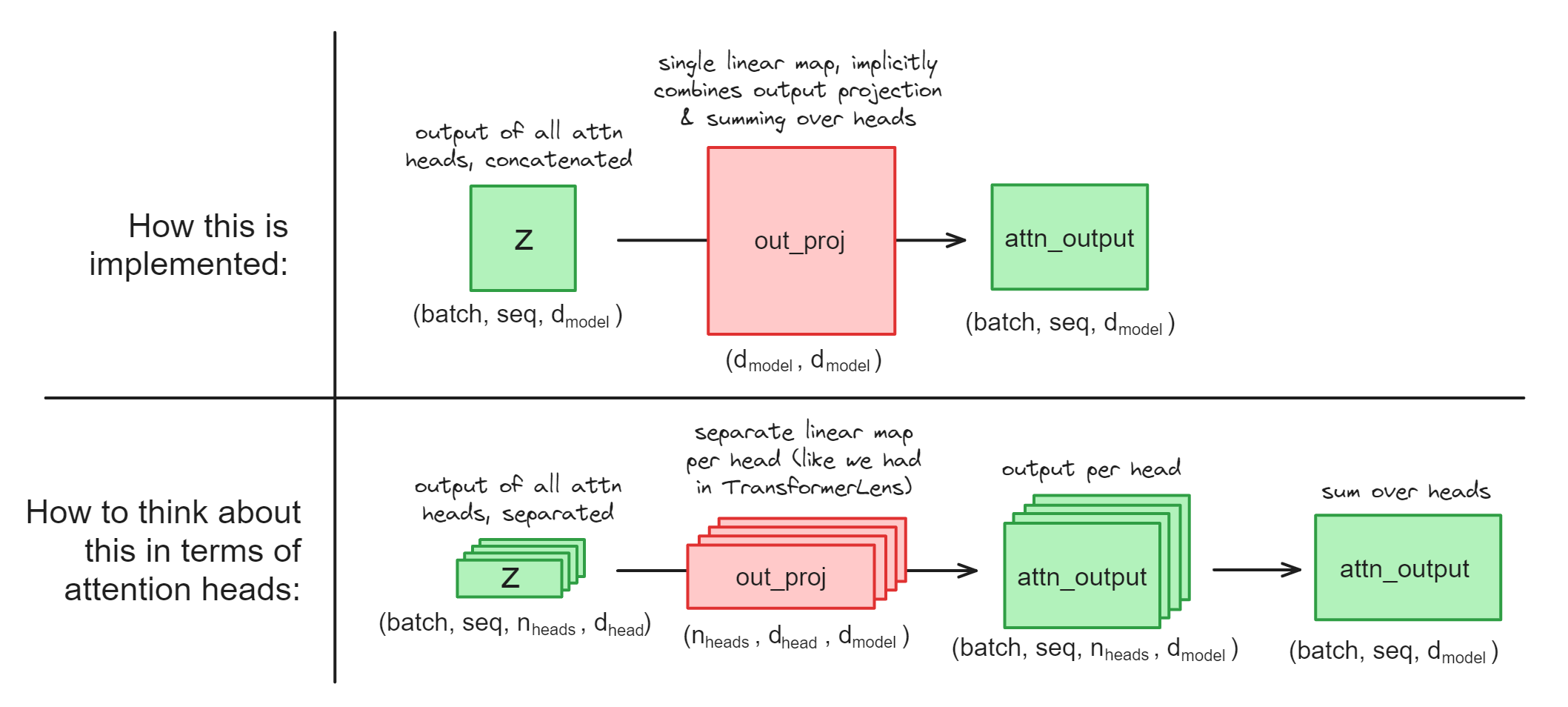
This presents some question for us, when it comes to causal interventions on attention heads. Use the dropdowns below to read them answer these questions (they'll be important for the coming exercises).
If we want to do a causal intervention on a particular head, should we intervene on z (the input of out_proj) or on attn_output (the output of out_proj) ?
We should intervene on z, because we can just rearrange the z tensor of shape (batch, seq, d_model) into (batch, seq, n_heads, d_head), in other words separating out all the heads. On the other hand, we can't do this with the attn_output because it's already summed over heads and we can't separate them out.
How could we get the attn_output vector for a single head, if we had the ability to access model weights within our context managers?
We can take a slice of the z tensor corresponding to a single attention head:
z.reshape(batch, seq, n_heads, d_head)[:, :, head_idx]
and we can take a slice of the out_proj weight matrix corresponding to a single attention head (remember that PyTorch stores linear layers in the shape (out_feats, in_feats)):
out_proj.weight.rearrange(d_model, n_heads, d_head)[:, head_idx]
then finally we can multiply these together.
How could we get the attn_output vector for a single head, if we didn't have the ability to access model weights within our context managers? (This is currently the case for nnsight, since having access to the weights could allow users to change them!).
We can be a bit clever, and ablate certain heads in the z vector before passing it through the output projection:
# ablate all heads except #2 (using a cloned activation)
heads_to_ablate = [0, 1, 3, 4, ...]
z_ablated = z.reshape(batch, seq, n_heads, d_head).clone()
z_ablated[:, :, heads_to_ablate] = 0

# save the output
attn_head_output = out_proj(z_ablated).save()
Illustration:
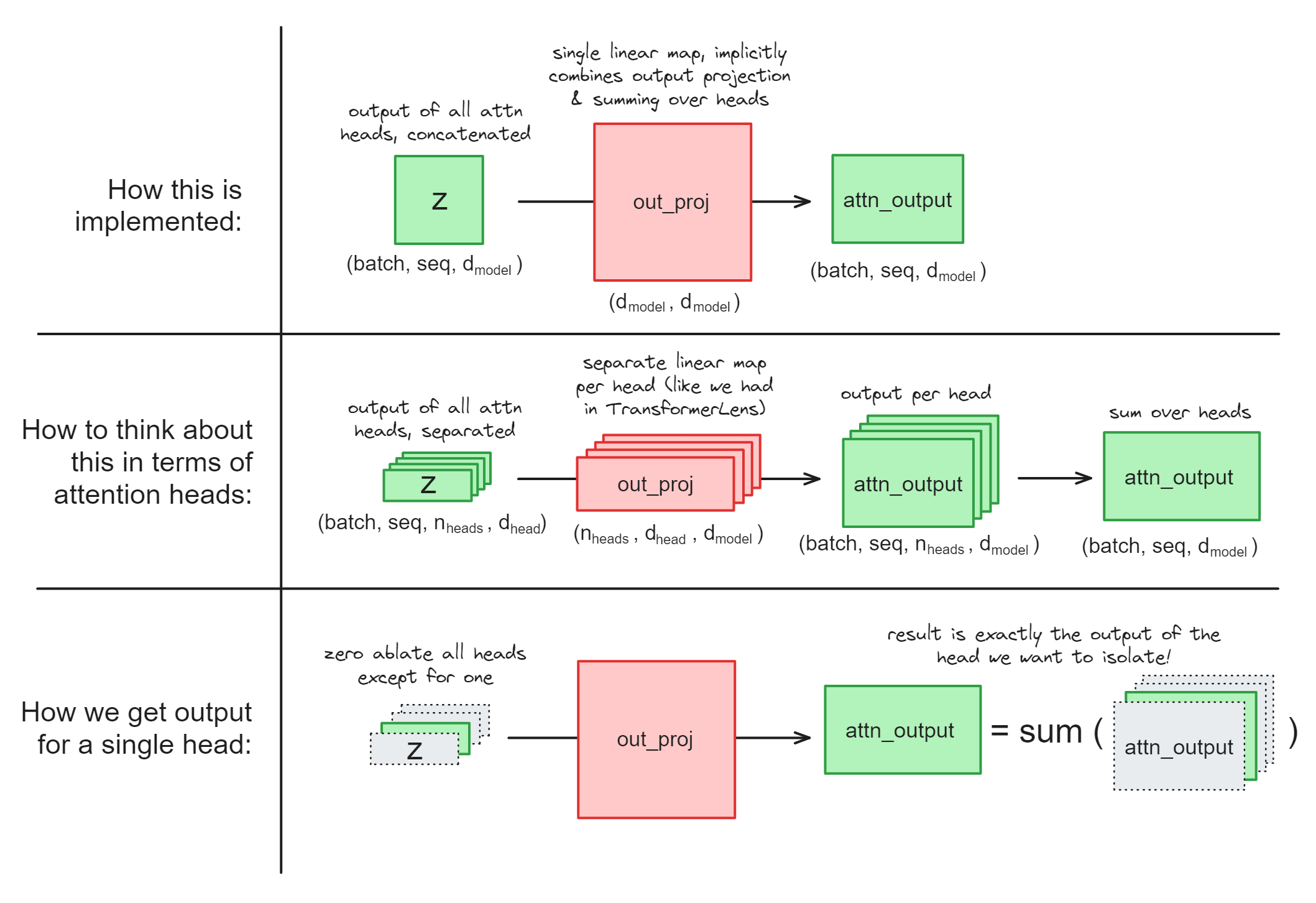
Note - this would actually fail if out_proj had a bias, because we want to just get an attention head's output, not the bias term as well. But if you look at the documentation page you'll see that out_proj doesn't have a bias term, so we're all good!
Exercise - implement calculate_fn_vectors_and_intervene
This is probably the most important function in today's exercises. Implementing it will be pretty similar to the previous function calculate_h_and_intervene, but:
- Rather than extracting the value of the residual stream
hat some particular layer, you'll be extracting the output of the attention heads: iterating over each layer and each head in the model.- You'll only need to run one clean forward pass to compute all these values, but you'll need to run a separate corrupted forward pass for each head.
- Rather than your 2 different datasets being (dataset, zero-shot dataset), your two datasets will be (dataset, corrupted version of that same dataset).
- You can use the method
create_corrupted_datasetmethod of theICLDatasetclass for this.
- You can use the method
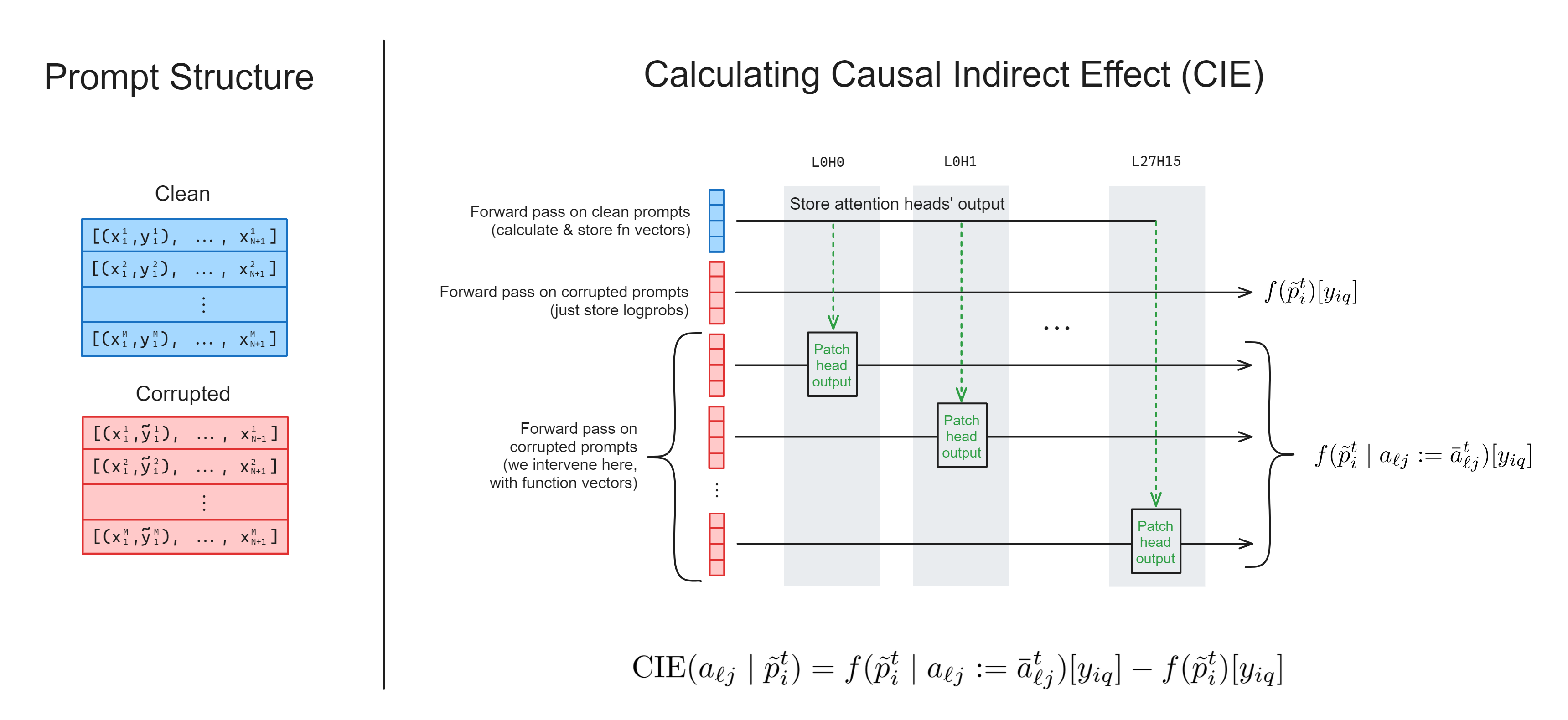
Before you actually start writing the code, it might be helpful to answer the following:
How many different invoke calls will you need in total?
You'll need (N_LAYERS * N_HEADS) + 2. To explain:
- One for the clean prompts, which you'll extract internal activations from and patch them into corrupted prompts,
- One for the corrupted prompts, which you don't intervene on,
- One for the corrupted prompts for every attention head, which you'll patch into using the clean run activations.
Which proxy outputs (if any) will you need to use .save() on, in this function?
You don't need to .save() the function vectors you're extracting from the model's internals, because these will only be used for causal interventions within the context manager.
The only thing you need to save is the correct token logprobs for (1) the corrupted forward pass where we don't intervene, and (2) each corrupted forward pass where we do intervene on one of the heads. In other words, you'll need to save (N_LAYERS * N_HEADS) + 1 tensors in total.
A few other notes:
- We've added a
layersargument, so you can iterate through different layers of the model (i.e. running the model withlayers = [3, 4, 5]will only test the intervention on the attention heads in layers 3, 4 and 5). This is helpful if you're getting memory errors when trying to run all layers at once (remember we have 24 layers, 16 heads per layer, so even with few prompts per head this adds up fast!).- We've included code for you below showing how you can call the function multiple times, clearing memory between each run, then combine the results.
- When it comes to intervening, you can set the value of a reshaped tensor, i.e.
tensor.reshape(*new_shape)[index] = new_valuewill change the values intensorwithout actually reshaping it (for more on this, see the documentation fortorch.Tensor.view). - It's good practice to insert a lot of assert statements in your code, to check the shapes are what you expect.
- If you're confused about dimensions, use
einops.rearrangerather than.reshape- this is a wonderful tool, it's like using code annotations within your actual code!
One last note - if this function is proving impossible to run for computational reasons, you can skip the exercise and move on to the next ones. They don't rely on this function working. However, you should definitely at least read & understand the solution.
def calculate_fn_vectors_and_intervene(
    model: LanguageModel,
    dataset: ICLDataset,
    layers: list[int] | None = None,
) -> Float[Tensor, "layers heads"]:
    """
    Returns a tensor of shape (layers, heads), containing the CIE for each head.

    Inputs:
        model: LanguageModel
            the transformer you're doing this computation with
        dataset: ICLDataset
            the dataset of clean prompts from which we'll extract the function vector (we'll also
            create a corrupted version of this dataset for interventions)
        layers: list[int] | None
            the layers which this function will calculate score for (if None, this means all layers)
    """
    raise NotImplementedError()
Solution
def calculate_fn_vectors_and_intervene(
    model: LanguageModel,
    dataset: ICLDataset,
    layers: list[int] | None = None,
) -> Float[Tensor, "layers heads"]:
    """
    Returns a tensor of shape (layers, heads), containing the CIE for each head.

    Inputs:
        model: LanguageModel
            the transformer you're doing this computation with
        dataset: ICLDataset
            the dataset of clean prompts from which we'll extract the function vector (we'll also
            create a corrupted version of this dataset for interventions)
        layers: list[int] | None
            the layers which this function will calculate score for (if None, this means all layers)
    """
    layers = range(model.config.n_layer) if (layers is None) else layers
    heads = range(model.config.n_head)

    # Get corrupted dataset
    corrupted_dataset = dataset.create_corrupted_dataset()
    N = len(dataset)

    # Get correct token ids, so we can get correct token logprobs
    correct_completion_ids = [toks[0] for toks in tokenizer(dataset.completions)["input_ids"]]

    with model.trace(remote=REMOTE) as tracer:
        # Run a forward pass on clean prompts, where we store attention head outputs
        z_dict = {}
        with tracer.invoke(dataset.prompts):
            for layer in layers:
                # Get hidden states, reshape to get head dimension, store the mean tensor
                z = model.transformer.h[layer].attn.out_proj.input[:, -1]
                z_reshaped = z.reshape(N, N_HEADS, D_HEAD).mean(dim=0)
                for head in heads:
                    z_dict[(layer, head)] = z_reshaped[head]

        # Run a forward pass on corrupted prompts, where we don't intervene or store activations (just so we can get the
        # correct-token logprobs to compare with our intervention)
        with tracer.invoke(corrupted_dataset.prompts):
            logits = model.lm_head.output[:, -1]
            correct_logprobs_corrupted = logits.log_softmax(dim=-1)[t.arange(N), correct_completion_ids].save()

        # For each head, run a forward pass on corrupted prompts (here we need multiple different forward passes, since
        # we're doing different interventions each time)
        correct_logprobs_dict = {}
        for layer in layers:
            for head in heads:
                with tracer.invoke(corrupted_dataset.prompts):
                    # Get hidden states, reshape to get head dimension, then set it to the a-vector
                    z = model.transformer.h[layer].attn.out_proj.input[:, -1]
                    z.reshape(N, N_HEADS, D_HEAD)[:, head] = z_dict[(layer, head)]
                    # Get logprobs at the end, which we'll compare with our corrupted logprobs
                    logits = model.lm_head.output[:, -1]
                    correct_logprobs_dict[(layer, head)] = logits.log_softmax(dim=-1)[
                        t.arange(N), correct_completion_ids
                    ].save()

    # Get difference between intervention logprobs and corrupted logprobs, and take mean over batch dim
    all_correct_logprobs_intervention = einops.rearrange(
        t.stack([v for v in correct_logprobs_dict.values()]),
        "(layers heads) batch -> layers heads batch",
        layers=len(layers),
    )
    logprobs_diff = all_correct_logprobs_intervention - correct_logprobs_corrupted  # shape [layers heads batch]

    # Return mean effect of intervention, over the batch dimension
    return logprobs_diff.mean(dim=-1)
As mentioned, the code below calls the function multiple times separately and combines the results.
When you run this code & plot the results, you should replicate Figure 3(a) in the Function Vectors paper (more or less). If the code is taking too long to run, we recommend just choosing a single layer to run, which has a distinctive pattern that can be compared to the paper's figure (e.g. layer 8, since head L8H1 has a much higher score than all the other heads in this layer).
dataset = ICLDataset(ANTONYM_PAIRS, size=8, n_prepended=2)


def batch_process_layers(n_layers, batch_size):
    for i in range(0, n_layers, batch_size):
        yield range(n_layers)[i : i + batch_size]


results = t.empty((0, N_HEADS), device=device)

# If this fails to run, you should reduce the batch size so the forward passes are split up more, or
# reduce dataset size
for layers in batch_process_layers(N_LAYERS, batch_size=4):
    print(f"Computing layers in {layers} ...")
    t0 = time.time()
    results = t.concat([results, calculate_fn_vectors_and_intervene(model, dataset, layers).to(device)])
    print(f"... finished in {time.time() - t0:.2f} seconds.\n")

imshow(
    results.T,
    title="Average indirect effect of function-vector intervention on antonym task",
    width=1000,
    height=600,
    labels={"x": "Layer", "y": "Head"},
    aspect="equal",
)
Click to see the expected output
Exercise - calculate the function vector
Your next task is to actually calculate and return the function vector, so we can do a few experiments with it. The function vector is the sum of the outputs of all the attention heads we found using the previous function (i.e. the sum of all of the vectors these heads write to the residual stream), averaged over the prompts in our dataset.
There's a difficulty here - rather than just getting the z vectors, we're actually trying to get the attn_out vectors, but before they're summed over heads. As we discussed previously, this is a bit tricky to do for the model we're working with, because the out_proj linear map actually does the "project up" and "sum over heads" operations simultaneously. It would be nice to just take a slice of the out_proj matrix and multiply it with a slice of the z vector, but the nnsight library doesn't yet allow users to access weights directly (for security reasons). To understand how we can extract the attn_out vector for a head separately without accessing the underlying weights, you should go back to read the subsection A note on out_proj at the start of this section.
def calculate_fn_vector(
    model: LanguageModel,
    dataset: ICLDataset,
    head_list: list[tuple[int, int]],
) -> Float[Tensor, " d_model"]:
    """
    Returns a vector of length `d_model`, containing the sum of vectors written to the residual
    stream by the attention heads in `head_list`, averaged over all inputs in `dataset`.

    Inputs:
        model: LanguageModel
            the transformer you're doing this computation with
        dataset: ICLDataset
            the dataset of clean prompts from which we'll extract the function vector (we'll also
            create a corrupted version of this dataset for interventions)
        head_list: list[tuple[int, int]]
            list of attention heads we're calculating the function vector from
    """
    raise NotImplementedError()


tests.test_calculate_fn_vector(calculate_fn_vector, model)
Solution
def calculate_fn_vector(
    model: LanguageModel,
    dataset: ICLDataset,
    head_list: list[tuple[int, int]],
) -> Float[Tensor, " d_model"]:
    """
    Returns a vector of length `d_model`, containing the sum of vectors written to the residual
    stream by the attention heads in `head_list`, averaged over all inputs in `dataset`.

    Inputs:
        model: LanguageModel
            the transformer you're doing this computation with
        dataset: ICLDataset
            the dataset of clean prompts from which we'll extract the function vector (we'll also
            create a corrupted version of this dataset for interventions)
        head_list: list[tuple[int, int]]
            list of attention heads we're calculating the function vector from
    """
    # Turn head_list into a dict of {layer: heads we need in this layer}
    head_dict = defaultdict(set)
    for layer, head in head_list:
        head_dict[layer].add(head)

    fn_vector_list = []

    with model.trace(dataset.prompts, remote=REMOTE):
        for layer, head_list in head_dict.items():
            # Get the output projection layer
            out_proj = model.transformer.h[layer].attn.out_proj

            # Get the mean output projection input (note, setting values of this tensor will not
            # have downstream effects on other tensors)
            hidden_states = out_proj.input[:, -1].mean(dim=0)

            # Zero-ablate all heads which aren't in our list, then get the output (which
            # will be the sum over the heads we actually do want!)
            heads_to_ablate = set(range(N_HEADS)) - head_dict[layer]
            for head in heads_to_ablate:
                hidden_states.reshape(N_HEADS, D_HEAD)[head] = 0.0

            # Now that we've zeroed all unimportant heads, get the output & add it to the list
            # (we need a single batch dimension so we can use `out_proj`)
            out_proj_output = out_proj(hidden_states.unsqueeze(0)).squeeze()
            fn_vector_list.append(out_proj_output.save())

    # We sum all attention head outputs to get our function vector
    fn_vector = sum([v for v in fn_vector_list])

    assert fn_vector.shape == (D_MODEL,)
    return fn_vector
Multi-token generation
We're now going to replicate some of the results in Table 3, in the paper:
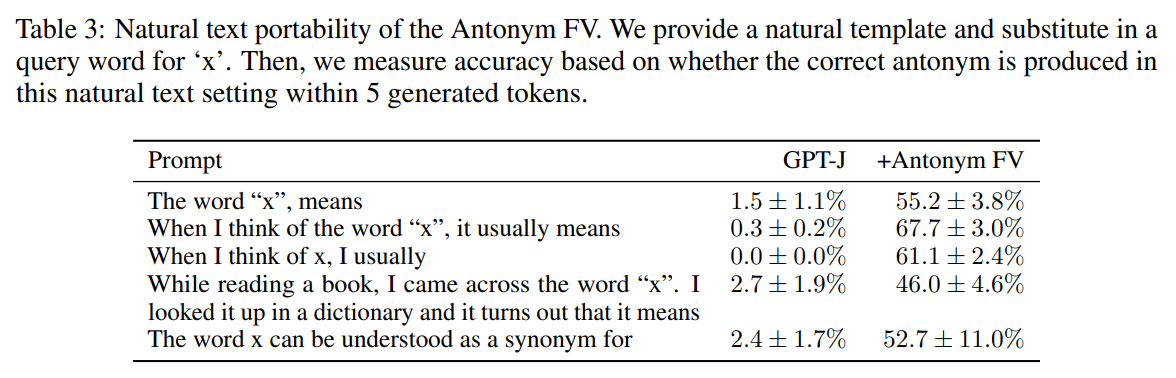
This will involve doing something we haven't done before - intervening on multi-token prompt generation.
Most of the interpretability exercises in this chapter have just consisted of running single forward passes, rather than autoregressive text generation. But we're trying something different here: we're adding the function vector to the final sequence position at each forward pass during text generation, and seeing if we can get the model to output a sentence with a different meaning.
The results of Table 3 came from adding the function vector to the residual stream at the final sequence position of the original prompt, and the final sequence position for each subsequent generation. The reason we do this is to guide the model's behaviour over time. Our hypothesis is that the function vector induces "next-token antonym behaviour" (because it was calculated by averaging attention head outputs at the sequence position before the model made its antonym prediction in the ICL prompts).
Using nnsight for multi-token generation
Previously, our context managers have looked like:
# Single invoke
with model.trace(prompt, remote=REMOTE):
    ... # Intervene on fwd pass

# Multiple invokes
with model.trace(remote=REMOTE) as tracer:
    with tracer.invoke(prompt):
        ... # Intervene on fwd pass
But for multi-token generation, we'll be using the generate method rather than trace. Our context managers will look like:
# Single invoke
with model.generate(prompt, remote=REMOTE, max_new_tokens=max_new_tokens):
    for n in range(max_new_tokens):
        ... # Intervene on fwd pass for n-th token to be generated
        model.next()

# Multiple invokes
with model.generate(max_new_tokens=max_new_tokens, remote=REMOTE) as generator:
    with generator.invoke(prompt):

        for n in range(max_new_tokens):
            ... # Intervene on fwd pass for n-th token to be generated
            model.next()
The line model.next() denotes that the following interventions should be applied to the forward pass which generates the next token.
Mostly, everything you learned during single-token generation generalizes to the multi-token case. For example, using .save() still saves proxies outside the context managers (although make sure that you don't use the same variable names over different generations, otherwise you'll overwrite them - it's easier to store your saved proxies in e.g. a list or dict).
Note that model.generate takes the same arguments as the normal HuggingFace generate method. This means we can use arguments like top_k, top_p, or repetition_penalty to control generation behaviour. In the exercises below we use a repetition penalty (we choose a value of 1.2, in line with the paper that suggested it) - this can avoid the model falling into loops of repeating the same sequence, which is especially common in steering when we're pushing the model OOD.
Key-Value Caching
TLDR - caching can make causal interventions inside model.generate more complicated, but if you only intervene on sequence positions other than the very last one. In our exercises, we'll only be intervening on the last seqpos so you don't need to worry about it, but it's still a useful topic to understand.
See this dropdown if you're curious for more details.
To speed up inference, transformer models perform key-value caching to speed up text generation. This means that the time taken to generate $n$ tokens is much less than $n$ times longer than generating a single token. See this blog post for more on transformer inference arithmetic.
When caching takes place, and we're doing causal interventions, we have to be careful that the caching won't override our causal interventions. Sometimes caching has to be disabled to make sure that our causal intervention works correctly. For example, if we wanted to perform the intervention "add the function vector to only the final sequence position of the prompt for each token we generate" then we'd have to disable caching (since previous forward passes would contain cached values where we intervened on a sequence position which is no longer the final sequence position). However, here we're performing the intervention "add the function vector to the final token of the original prompt, and to all subsequent sequence positions", meaning enabling caching (the default behaviour) will give us the right causal intervention.
Generator Output
The object generator.output is by default a tensor which contains the model's token ID completions (not the logits).
By default the generate method will generate tokens greedily, i.e. always taking the maximum-probability token at each step. For now, we don't need to worry about changing this behaviour. But in future exercises we'll experiment with different sampling methods than greedy sampling (which generate uses by default), so generator.output and argmaxing over logits will not be identical!
Exercise - intervene with function vector, in multi-token generation
You should now fill in the function intervene_with_fn_vector below. This will take a function vector (calculated from the function you wrote above), as well as a few other arguments (see docstring), and return the model's string completion on the given prompt template.
We hope to observe results qualitatively like the ones in Table 3, i.e. having the model define a particular word as its antonym.
def intervene_with_fn_vector(
    model: LanguageModel,
    word: str,
    layer: int,
    fn_vector: Float[Tensor, " d_model"],
    prompt_template='The word "{x}" means',
    n_tokens: int = 5,
) -> tuple[str, str]:
    """
    Intervenes with a function vector, by adding it at the last sequence position of a generated
    prompt.

    Inputs:
        model: LanguageModel
            the transformer you're doing this computation with
        word: str
            The word substituted into the prompt template, via prompt_template.format(x=word)
        layer: int
            The layer we'll make the intervention (by adding the function vector)
        fn_vector: Float[Tensor, "d_model"]
            The vector we'll add to the final sequence position for each new token to be generated
        prompt_template:
            The template of the prompt we'll use to produce completions
        n_tokens: int
            The number of additional tokens we'll generate for our unsteered / steered completions

    Returns:
        completion: str
            The full completion (including original prompt) for the no-intervention case
        completion_intervention: str
            The full completion (including original prompt) for the intervention case
    """
    raise NotImplementedError()
Solution
def intervene_with_fn_vector(
    model: LanguageModel,
    word: str,
    layer: int,
    fn_vector: Float[Tensor, " d_model"],
    prompt_template='The word "{x}" means',
    n_tokens: int = 5,
) -> tuple[str, str]:
    """
    Intervenes with a function vector, by adding it at the last sequence position of a generated
    prompt.

    Inputs:
        model: LanguageModel
            the transformer you're doing this computation with
        word: str
            The word substituted into the prompt template, via prompt_template.format(x=word)
        layer: int
            The layer we'll make the intervention (by adding the function vector)
        fn_vector: Float[Tensor, "d_model"]
            The vector we'll add to the final sequence position for each new token to be generated
        prompt_template:
            The template of the prompt we'll use to produce completions
        n_tokens: int
            The number of additional tokens we'll generate for our unsteered / steered completions

    Returns:
        completion: str
            The full completion (including original prompt) for the no-intervention case
        completion_intervention: str
            The full completion (including original prompt) for the intervention case
    """
    prompt = prompt_template.format(x=word)

    with model.generate(remote=REMOTE, max_new_tokens=n_tokens, repetition_penalty=1.2) as generator:
        with model.all():
            with generator.invoke(prompt):
                tokens = model.generator.output.save()

            with generator.invoke(prompt):
                model.transformer.h[layer].output[0][:, -1] += fn_vector
                tokens_intervention = model.generator.output.save()

    completion, completion_intervention = tokenizer.batch_decode(
        [tokens.squeeze().tolist(), tokens_intervention.squeeze().tolist()]
    )
    return completion, completion_intervention
To test your function, run the code below. You should find that the first completion seems normal, but the second completion defines a word as its antonym (you might have to play around a bit with the scale factor of fn_vector, to balance between effectiveness and coherence of output). If this works, congratulations - you've just successfully induced an OOD behavioural change in a 6b-parameter model!
# Remove word from our pairs, so it can be a holdout
word = "light"
_ANTONYM_PAIRS = [pair for pair in ANTONYM_PAIRS if word not in pair]

# Define our dataset, and the attention heads we'll use
dataset = ICLDataset(_ANTONYM_PAIRS, size=20, n_prepended=5)
head_list = [
    (8, 0),
    (8, 1),
    (9, 14),
    (11, 0),
    (12, 10),
    (13, 12),
    (13, 13),
    (14, 9),
    (15, 5),
    (16, 14),
]

# Extract the function vector
fn_vector = calculate_fn_vector(model, dataset, head_list)

# Intervene with the function vector
completion, completion_intervention = intervene_with_fn_vector(
    model,
    word=word,
    layer=9,
    fn_vector=1.5 * fn_vector,
    prompt_template='The word "{x}" means',
    n_tokens=40,
)

table = Table("No intervention", "intervention")
table.add_row(repr(completion), repr(completion_intervention))
rprint(table)
Click to see the expected output
┏━━━━━━━━━━━━━━━━━━━━━━━━━━━━━━━━━━━━━━━━━━━━━━━━━━━━━━━━┳━━━━━━━━━━━━━━━━━━━━━━━━━━━━━━━━━━━━━━━━━━━━━━━━━━━━━━━━┓
┃ No intervention                                        ┃ intervention                                           ┃
┡━━━━━━━━━━━━━━━━━━━━━━━━━━━━━━━━━━━━━━━━━━━━━━━━━━━━━━━━╇━━━━━━━━━━━━━━━━━━━━━━━━━━━━━━━━━━━━━━━━━━━━━━━━━━━━━━━━┩
│ 'The word "light" means different things to different  │ 'The word "light" means dark, and the word "darkness"  │
│ people. To some, it is a symbol of hope and freedom;   │ means light.\n\n—Johannes Kepler (1571–1630)\n\nIn a   │
│ for others, the light represents darkness and          │ world of darkness, we are all blind;'                  │
│ death.\n\nIn this article I will be discussing what    │                                                        │
│ the Bible'                                             │                                                        │
└────────────────────────────────────────────────────────┴────────────────────────────────────────────────────────┘
Exercise - generalize results to another task (optional)
In this exercise, you get to pick a task different to the antonyms task, and see if the results still hold up (for the same set of attention heads).
We'll leave this exercise fairly open-ended, without any code templates for you to fill in. However, if you'd like some guidance you can use the dropdown below.
Guidance for exercise
Whatever your task, you'll want to generate a new set of words. You can repurpose the generate_dataset function from the antonyms task, by supplying a different prompt and initial set of examples (this will require generating & using an OpenAI api key, if you haven't already), or you can just find an appropriate dataset online.
When you define the ICLDataset, you might want to use bidirectional=False, if your task isn't symmetric. The antonym task is symmetric, but others (e.g. the Country-Capitals task) are not.
You'll need to supply a new prompt template for the intervene_with_fn_vector function, but otherwise most of your code should stay the same.
with open(section_dir / "data/country_capital_pairs.txt", "r", encoding="utf-8") as f:
    COUNTRY_CAPITAL_PAIRS = [line.split() for line in f.readlines()]

country = "Netherlands"
_COUNTRY_CAPITAL_PAIRS = [pair for pair in COUNTRY_CAPITAL_PAIRS if pair[0] != country]

dataset = ICLDataset(_COUNTRY_CAPITAL_PAIRS, size=20, n_prepended=5, bidirectional=False)
head_list = [
    (8, 0),
    (8, 1),
    (9, 14),
    (11, 0),
    (12, 10),
    (13, 12),
    (13, 13),
    (14, 9),
    (15, 5),
    (16, 14),
]

fn_vector = calculate_fn_vector(model, dataset, head_list)

# Intervene with the function vector
completion, completion_intervention = intervene_with_fn_vector(
    model=model,
    word=country,
    layer=9,
    fn_vector=fn_vector,
    prompt_template="When you think of {x},",
    n_tokens=40,
)

table = Table("No intervention", "intervention")
table.add_row(repr(completion), repr(completion_intervention))
rprint(table)
Click to see the expected output
┏━━━━━━━━━━━━━━━━━━━━━━━━━━━━━━━━━━━━━━━━━━━━━━━━━━━━━━━━┳━━━━━━━━━━━━━━━━━━━━━━━━━━━━━━━━━━━━━━━━━━━━━━━━━━━━━━━━┓
┃ No intervention                                        ┃ intervention                                           ┃
┡━━━━━━━━━━━━━━━━━━━━━━━━━━━━━━━━━━━━━━━━━━━━━━━━━━━━━━━━╇━━━━━━━━━━━━━━━━━━━━━━━━━━━━━━━━━━━━━━━━━━━━━━━━━━━━━━━━┩
│ 'When you think of Netherlands, what comes to your     │ 'When you think of Netherlands, Amsterdam is the first │
│ mind?\n\nThe tulips and windmills. The cheese and the  │ thing that comes to mind. The city has a lot more than │
│ clogs. The canals and bicycles. And most importantly:  │ just canals and windmills though; it’s also home to    │
│ the Dutch people! They are known'                      │ some of Europe’s most'                                 │
└────────────────────────────────────────────────────────┴────────────────────────────────────────────────────────┘